Filesystem
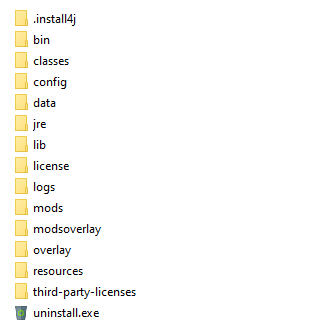
Key folders and their purpose are:
- .install4j - contains informationen written/used by the installer. Do not modify.
- bin – contains startup scripts. Do not modify.
- classes - part of the class path. Contains the configuration files for Hazelcast.
- config – contains configuration files. The most important file is the boot.json file, the main bootstrap file. It contains the bare minimum to get the server started. The phenix-store.json contains most PhenixID Server settings. The log4j2.xml file regulates the level of logging in the server. How logging works and is configured is described in detail in separate document which can be found here. By changing settings in the extraoptions.vmoptions file (can be created if it doesn't exist) custom boot behavior can be achieved. Please consult PhenixID support before changing anything in any file.
- data - holds the reporting data and additional "non system configuration".
- jre - the Java Runtime Environment in which the server runs. Do not modify, unless modifications to the JRE is needed.
- lib - various important system libraries used by the server, part of the class path. Do not modify.
- license – This the location of the license. How to replace the license is described here.
- logs – Contains log files. A more deep documentation for logging can be found here. server.log – contains system information used for troubleshooting. event.log – contains server events like startup, deployment and more
- mods – Contains the server modules. This will be overwritten on upgrade. Do not modify.
- modsoverlay - In case the server modules needs to be customized, the modifications can be placed here using the same relative path as the original file in the mods directory, for example templates, translations, patches (class-files) etc.
- overlay - where to put graphical customizations for certain modules.
- resources - where certain modules might read certain resources from, might be customized if needed.
- thirdy-party-licenses - licenses for various third party libraries
Explanation of important files
- classes/cluster.xml - contains default settings when running PhenixID server in a clustered state.
- config/boot.json - contains bootstrap configuration such as default modules to deploy and the http port for the admin UI. Settings in this file will not be shown in UI.
- config/log4j.xml - log settings file. The default log setting is INFO. This setting will only provide error messages and limited runtime information. By changing settings in this file you can get more detailed information. Note that changes in this file will be picked up without system restart. Recommended log setting is INFO.
- config/phenix-store.json - The system configuration file. Contains all additional runtime configuration not found in boot.json. The admin UI reads and saves changes from/to this file. Changes in this file is picked up without system restart.