Prism Languages
The Prism module comes with two languages by default, Swedish and English. The language configuration makes it possible to override and extend the default languages as well as adding new languages.
Prism works with namespaces, where one is a common namespace and one is a sub-module specific namespace. These two namespaces consists of two different files per language and will be merged in runtime.
Note
The working folder for all language customizations is [install folder]/mods/com.phenixidentity~phenix-prism/web-app/locales, also abbreviated to /mods/.../web-app/locales below.
Replicate this folder structure in your /modsoverlay/ folder if it does not yet exist.
Since /modsoverlay/ is not overwritten during install, any content in this folder will not be changed during future updates.
The examples below shows English, but any modifications needs to be done to all languages you plan to support.
Namespaces
Prism modules that holds the non-legacy mode (legacy_mode: false) uses two namespaces - common and submodule (ie in the FedSigning module, the submodule namespace will be called fedsigning).
The translations in the common namespace will be the same for all non-legacy mode prism modules, but the submodule namespace will only be accessible for the respective submodule.
File Structure
The default language files that come with the application are located in /mods/. This file structure applies to all languages, i.e. for English:
/mods/com.phenixidentity~phenix-prism/web-app/locales/en/common.json
/mods/com.phenixidentity~phenix-prism/web-app/locales/en/fedsigning.json
To override and/or extend the default language file, add new JSON files in the corresponding directory in /modsoverlay/
/modsoverlay/com.phenixidentity~phenix-prism/web-app/locales/en/common.json
/modsoverlay/com.phenixidentity~phenix-prism/web-app/locales/en/fedsigning.json
When the application loads, the "common.json" in /modsoverlay/.../web-app/locales/en will be merged into the same namespace as the file the "common.json" file residing in /mods/.../web-app/locales/en, in this case meaning:
- Any identical JSON tree structure in "common.json" in the /modsoverlay/../web-app/locales/ file structure will override and replace the corresponding tree structure in "common.json" within the /mods/../web-app/locales/ file structure.
- Any new tree structure in "common.json" /modsoverlay/../web-app/locales/ will be added to the "common.json" /mods/../web-app/locales/ tree structure.
Example
common.json in the /mods/../web-app/locales/ file structure
{
    "glossary": {
        "cancel": "Cancel"
    },
    "errors": {
        "generalError": "Something went wrong!"
    }
}
common.json in the /modsoverlay/../web-app/locales/ file structure
{
    "glossary": {
        "cancel": "Abort"
    },
    "errors": {
        "generalError": "Oops"
    }
}
fedsigning.json in the /mods/../web-app/locales/ file structure
{
    "htmlTitle": "Signing"
}
fedsigning.json in the /modsoverlay/../web-app/locales/ file structure
{
    "htmlTitle": "My sign page"
}
Result after merge:
{
    "common": {
        "glossary": {
            "cancel": "Abort"
        },
        "errors": {
            "generalError": "Oops"
        }
    },
    "fedsigning": {
        "htmlTitle": "My sign page"
    }
}
Worth noting:
- The common.json file has become its own namespace
- The fedsigning.json file has also become its own namespace
- The /mods/../web-app/locales/ settings has been overridden by the properties within the /modsoverlay/../web-app/locales/ settings
Add a New Language
Create a new folder named after the language code, (e.g., "fi" for Finnish), in /modsoverlay/.../web-app/locales/. Create a text file in this folder called "display_name.txt".
/modsoverlay/com.phenixidentity~phenix-prism/web-app/locales/fi/display_name.txt
In the text file, write how the language should appear in the language selector, for example:
Suomi
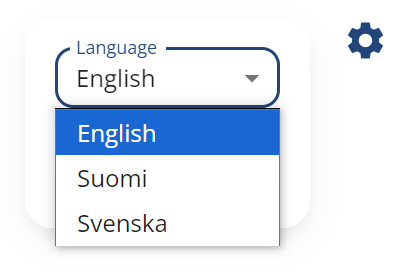
Copy the original "common.json" and the "fedsigning.json" language file from either English or Swedish in /mods/.../web-app/locales/ into the new language code folder:
/modsoverlay/com.phenixidentity~phenix-prism/web-app/locales/fi/common.json
/modsoverlay/com.phenixidentity~phenix-prism/web-app/locales/fi/fedsigning.json
Translate the content of both files to the new language.
Implementation specific translation
If there are multiple prism modules or submodules and you want to use different translations for each module, appearance profiles can be utilized.
In the appearance profile, you can specify what languages to use and if you have additional translations that you want to use. In the additional translations, the merged version of the namespaced translation must be used.
Example
The prism configuration:
{
    "id": "my-prism-module",
    "name": "com.phenixidentity~phenix-prism",
    "enabled": "true",
    "config": {
        "base_url": "/my_prism",
        "auth_redirect_url": "/my_prism/authenticate/auth_00",
        "module_refs": "sub_prism",
        "legacy_mode": "false",
        "appearanceProfile": {
            "localizationConfig": {
                "languageIds": [ "sv", "en" ],
                "additionalTranslations": [ "my-other-translation" ]
            }
        }
    }
}
Worth noting:
- The appearanceProfile is not an array
- The
use_if_expris not available in the prism version of the appearance profile
The my-other-translation.json translation file (should be added to all language folders):
{
    "common": {
        ... // Translations goes here
    },
    "fedsigning": {
        ... // Translations goes here
    }
}
The my-other-translation.json will override all other translation for that respective module